Narrated films recorded on the running system, not mock-ups: a full day at a bank, workflows built by talking to the Dialog, a cyber case from first alert to closure, dashboards built by asking, and walk-throughs for the team lead, the agency builder and the IT team. Every film has chapters — click one to jump there, and it carries the narration and what to look for on screen.
45:52
Start here · the full story
Credentials go on sale overnight; by morning the login wave, the mule accounts and the money are one case. A full day across security, fraud, operations and the MLRO, closing with a walkthrough of the Knowledge Fabric.
Watch · 9 chapters →
7:26
For whoever designs the workflows
A KYC review built by talking to the Dialog, tested without changing anything and traced step by step — then an event workflow that runs by itself the moment a high alert arrives.
Watch · 13 chapters →
3:31
For the analyst
A ransomware crew with forty-one victims: the Dialog, the case file, the graph, live threat-feed capture, enrichment with provenance, a background check, agencies and the case process.
Watch · 11 chapters →
6:03
For the team lead
Everything under one workspace — graphs, live feeds, cases, tools — and a Dialog on every screen that knows what you are looking at and runs the work on it.
Watch · 11 chapters →
9:14
For whoever builds the agencies
The Studio, the template library, an agency’s anatomy and trace, analytics, Plan with AI, chains with human gates, automation and governance.
Watch · 15 chapters →
4:27
For the IT team
Systems read in place, the self-writing catalogue, your schema, the model registry and data boundary, identity, accreditation and every settings screen.
Watch · 12 chapters →
5:20
For whoever reports on the work
A fraud lead asks the Dialog for a dashboard and gets it built and checked in about twenty seconds — then a view for every team, from the same governed data.
Watch · 12 chapters →
5:07
For whoever relies on the documents
Originals that cannot change, AI that quotes its sources, mark-up for the team, every version compared word by word — and authenticity checks that find a figure changed after signing.
Watch · 17 chapters →
41:53
For the whole FCU team · a day at a Frankfurt bank
Eight people, one working day: the data estate, onboarding, approval, the MLRO's decisions, screening, who may see what and the quality check. Narrated and subtitled, every screen the live product.
Watch · 11 chapters →Operation Mirage: credentials for an illustrative bank, Meridian, go on sale overnight; by morning the login wave, the mule accounts and the money moving to a crypto desk turn out to be one story. The film follows a full day across the security, fraud, operations and MLRO desks — the Knowledge Fabric reading every system in place, the agencies working within policy, and people deciding what policy reserves, two teams reading one customer two ways, and a closing walkthrough of the Knowledge Fabric itself. All names, wallets and amounts are invented. Open the film page for every scene.
Why this matters. Every bank can buy the same AI models; what none can buy is what the bank itself knows. The film follows one day at an illustrative bank, Meridian, where a cyber incident and a fraud turn out to be the same story.
The ground everything stands on. The analyst signs in and the Knowledge Fabric shows the bank’s estate — its detailed walkthrough is the last chapter. Then the systems are connected, graded and read into the model, and the Studio shows the agencies built on top.
The analyst builds one investigation from the sources the workspace already reads, and drives it through the AIState Dialog rather than by hand. Overnight the agencies find, type and corroborate; at dawn they propose — and a person decides.
The graph joins what no single system holds: one customer across four systems. The morning team signs in, each following the alert that brought them, and the case is raised, peopled and argued.
The money is followed to the Lisbon desk, and the freeze goes through two people. The same customer is read two ways by two teams from one graph. The reach-out agency stops a £60,000 payment. And the graph itself is shown to be access-controlled.
The investigation goes after the infrastructure and the money that can still be reached. Every hop is graded, attribution meets its threshold, requests go out from the case and replies come back as evidence.
What keeps it defensible. Deconfliction across the information barrier, incidents raised by the platform itself, a suspicious activity report on a restricted route, quality challenging the day, and the knowledge the bank keeps.
The day in numbers, the whole machine on one screen, and what it rests on.
The core of AIState, in detail: how the bank’s data is organised without copying it. Every source connected with its own access control, lineage across the systems, a dashboard for every source, the schema and the ontologies, governance and observability — then the graph: the full estate on one canvas, its geography, and the investigation built from the sources.
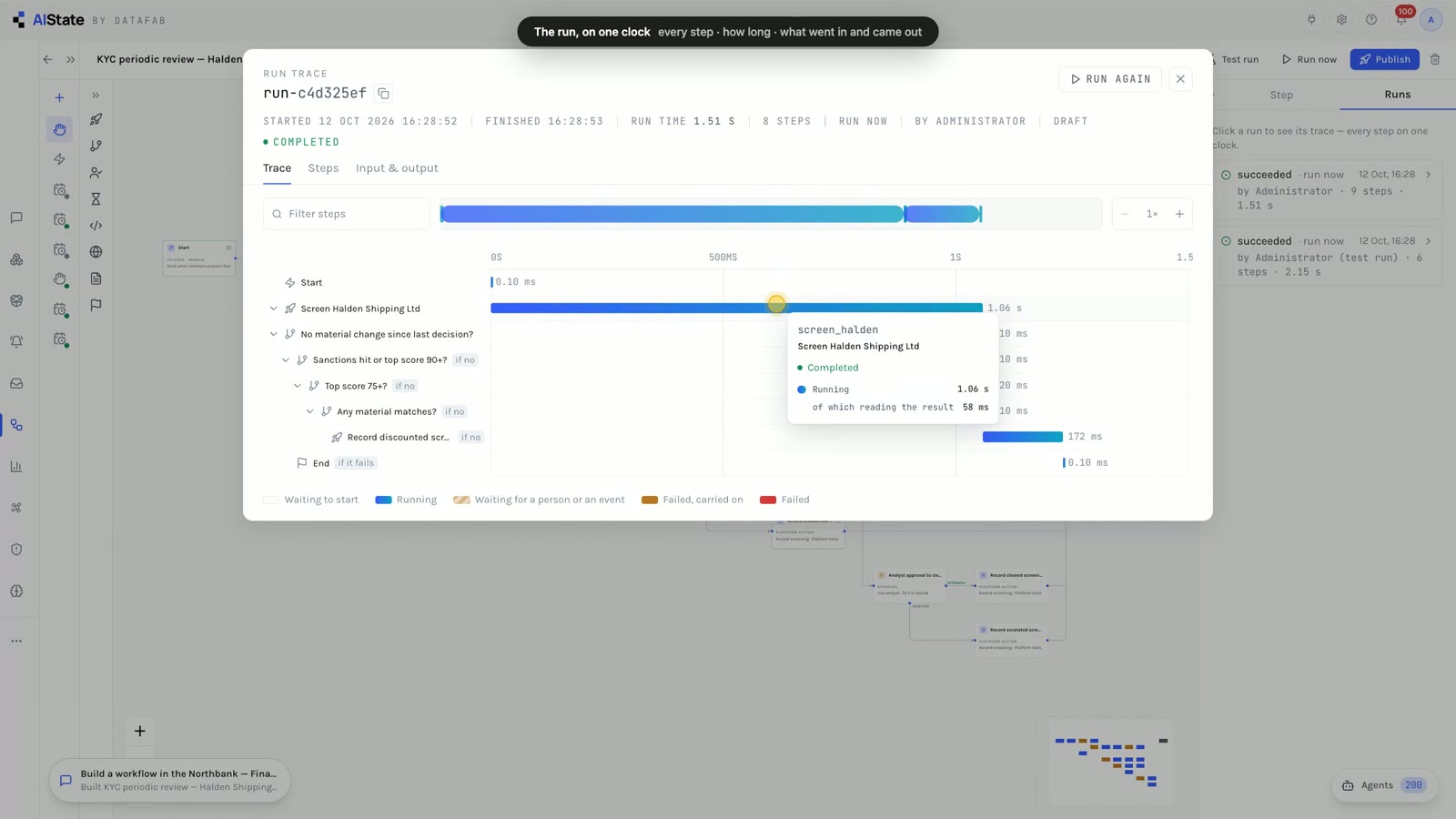
A workflow is a job that runs on its own: by hand, on a schedule, or the moment something happens. A compliance lead describes a KYC periodic review to the Dialog and it is built in under a minute from the platform’s own actions, tools and agencies; a test run reads the live data and changes nothing; the real run carries an unchanged decision forward; the run trace shows every step on one clock. Then a starter becomes an event workflow — and when an outside system raises a high alert, it runs by itself within seconds. Wait steps, twelve events, a webhook address and the 24-step perpetual-KYC starter complete it.
“This is AIState's workflow builder. A workflow is a job that runs on its own: by hand, on a schedule, or the moment something happens. And instead of dragging boxes for an afternoon, you can simply describe it. Every step is a real building block: the platform's own actions, like screening, alerts and assignments; over six hundred tools and data connectors; and over a hundred AI agents. Each one keeps its permissions, its audit trail and its review queue.”
The Workflows list, and the Build with the Dialog button.
“A compliance lead wants a periodic KYC review for one of the bank's customers, Halden Shipping. They write down how their team works: screen the customer, carry forward an unchanged decision, three risk bands, an agent review, and human sign-off where it matters. The Dialog hands the request to the workflow builder. It picks the right blocks, finds Halden Shipping in the workspace so every step works on the real customer record, and checks the whole graph the way the designer would. Anything that cannot run is repaired before you see it.”
The request typed into the Dialog; the workflow builder at work.
“Here it is. The screening against every sanctions, PEP and watch list, retried if it fails; then the decision path, exactly as it was described: a sanctions hit or a score of ninety goes to a supervisor, seventy-five goes straight to an analyst, and material matches go to an agent first. The KYC profile reviewer agent reads the customer's whole file. Its findings go to the review queue, not straight into the record, and an analyst decides whether to clear the customer.”
The designer: the screening step, the bands, the KYC profile reviewer agent and the analyst approval.
“Before anything is real, a test run. It reads the live data, but changes nothing: every step that would raise an alert, assign work or ask a person says what it would have done instead.”
Test run → the step-by-step test result in Runs: what ran, what ran as a preview, what was only described.
“Now for real, on Halden Shipping's live record. Halden Shipping was reviewed before, and nothing material has changed since: the same identity, and the same screening picture. So the run records the earlier decision as carried forward, with its evidence, and stops. Nobody re-reviews what has not changed, and if anything had changed, the matching band would have run instead.”
Run now → the run in Runs; the carry-forward path on the graph.
“Every run has a trace: each step on one clock, nested under the condition or the approval that led to it, with how long each one took; a wait for a person or an event shows as its own bar. Click any step to see exactly what went in, and what came out.”
The run trace: the waterfall, a step’s timing, then the screening step’s input and output.
“Changing it is just as easy. Ask the Dialog to run it every Monday morning, and to publish it. From then on it runs on its own, and every run is kept, step by step.”
The follow-up typed into the Dialog; the trigger becomes a weekly schedule.
“Not every workflow has to be described from scratch. There are ready-made starters: perpetual KYC, adverse news, document chasing, new customers, confirmed matches, rising risk, closed cases. Each one is a complete workflow to adapt.”
New workflow → Start from: the starters, and Assign new high alerts as they arrive chosen.
“This one runs on an event: whenever a high or critical alert is raised, and the discount rules keep it, it goes to the analyst with the fewest open items, and they are told. A critical one also goes to a supervisor. The trigger says which event, and which ones count: alerts from any source, at high or above. A short wait can fold a burst of events into one run, and a workflow never starts itself in a loop. Publish it, and it is listening.”
The new workflow; the trigger set to An alert is raised, from any source, high or above; Publish.
“And there are twelve events to start from: an alert raised, escalated or closed; a case opened or changing status; a subject added; evidence filed; a request for information answered; a client's KYC details changing; computed risk rising; or any outside system calling the workflow's own address, with its own token.”
The list of events a workflow can start on.
“Now the bank's transaction monitoring system raises a high alert on Halden Shipping: nine cash deposits just under the reporting threshold, in five days. Nobody presses anything. Within seconds, the workflow has started on its own. Its trace shows what it did: the alert was high, so it went to the analyst with the fewest open items, and they were told. The run says it was started by the event, and which alert it was about.”
The alert raised from outside; Runs → Started by events; the event run’s trace.
“Workflows can also wait. This starter asks an analyst to collect up-to-date KYC documents, then waits until the task is done, or the deadline passes, and chases if it has to. A wait can last until a task is done, an alert or case is closed, new evidence is filed, or a request for information is answered.”
The Ask for documents and chase starter, its wait step selected.
“And the largest starter runs perpetual KYC. Every night it looks at every client for trigger events: identity, country, ownership, PEP status, screening, risk, reviews, documents and activity; it checks adverse news; and it routes what is material, with a supervisor's approval for enhanced due diligence. Everything is in this library, and can be added by hand too: the platform's own actions, the agents, the built-in tools, and the MCP servers your organization connects. That is AIState's workflow builder: described in words or started from a starter; tested without changing anything; run by hand, on a schedule, or the moment something happens; and every run traceable, step by step.”
The 24-step perpetual KYC starter; the library searched for sanctions and agencies; the Workflows list.
Described in plain English and built from the platform’s own actions, tools and agencies, on the real records; checked and repaired before it is handed over
A test run reads the live data and changes nothing; every step that would act says what it would have done
Each step on one clock, nested under the condition, approval or wait that led to it; what went in and what came out
Twelve events — alerts, cases, subjects, evidence, RFIs, client changes, rising risk — with filters, and a webhook for outside systems
Wait until a task is done, an alert or case is closed, evidence is filed or an RFI is answered; approvals by role, department or person
Perpetual KYC, adverse news, document chasing, new customers, confirmed matches, rising risk, closed cases — complete workflows to adapt
Operation Nightjar (CASE-2026-0080): a ransomware-as-a-service crew with forty-one victims, two of them hospitals. Attribution from leak-site infrastructure, a shared cryptographic key and affiliate-panel access through a cooperating affiliate. The video follows the analyst through the dialog, the case file, the graph, live threat-feed capture, MCP enrichment with provenance, a background check, evidence and documents, agencies, and the BPMN workflow.
“This is AIState. In the next three minutes, an analyst works a ransomware case from the first alert to closure — one graph, one case file, one dialog.”
“The day starts with the dialog. It reads the platform's own API, so it can pull up what matters on Operation Nightjar — the case, its overdue tasks, the subjects — as live widgets rather than paragraphs.”
The analyst types a plain question; the execution trace shows the model reading the action catalogue and calling the case API; the case card and task list arrive as widgets while the answer is still being written.
“Operation Nightjar: a ransomware crew with forty-one victims, two of them hospitals. The case file holds everything in one place — subjects, evidence with a chain of custody, warrants and orders, tasks and deadlines — and the workflow the case has to follow.”
Number, priority and classification; synopsis; the squad discussion; open tasks and legal process counts; the audit trail behind every tab is hash-chained.
“This is the value of the graph. The crew's infrastructure, affiliates, wallets and mule accounts, connected. Community detection separates the cells; centrality shows what holds the network together — the entity to build the case around.”
Analysis → Communities draws hulls around the cells; Analysis → Betweenness sizes the nodes by how much of the network passes through them.
“Live capture streams threat feeds and telemetry straight into a monitoring graph — botnet command-and-control trackers, certificate streams, your own systems — through a processing pipeline that filters, routes and raises alerts inside your boundary, with the retention you set.”
First the Feodo Tracker C2 watch (source → transform → graph), then a streaming telemetry graph at ~3 events/s with the analysis bar underneath.
“Subjects are enriched through MCP connectors: company registries, sanctions lists, public records, the open web. Every attribute keeps its provenance — which tool produced it, what was cited, the link and the confidence — so the file stands up to scrutiny.”
The Subjects list, one row per entity; the hosting provider expanded to its attributes; hovering a source badge shows the connector and tool, the citation, the link, confidence, who ran it and when.
“One click runs a full background check on a target: identity, internal record, sanctions and PEP screening, registries, adverse media, courts and the digital footprint — graded, sourced and printable.”
The case's Background checks tab with each subject's latest grade, then the primary target's report: assessment, key findings, gaps, recommended actions, findings by severity.
“Evidence is sealed, encrypted and re-hashed on every download. Documents are extracted and searchable across the case, indicators of compromise are tracked with the exhibits that carry them, and a disclosure package is produced on demand.”
Exhibits with type, custody state and classification; the Indicators tab for IOCs (import, extract, ATT&CK).
“Agents do the routine work — risk scoring, indicator extraction, case-file review, deadline watch — system-wide, on a schedule or on an event, writing within policy, with the changes your policy reserves confirmed by an investigator.”
The system-agencies dock bottom-right with its open findings on this case.
“The case follows a BPMN workflow — standard notation, a standard engine — with SLA timers that escalate. And every status change is a named transition with a reason, written to the timeline and the audit trail.”
The Process tab: the running lifecycle at Investigation with its 30-day timer and the diagram; then the status dialog drawn as a workflow with a transition selected and its reason field.
“AIState by DataFab. Unify, Resolve, Govern, Encode, Engage.”
The dialog reads the platform's API as an action catalogue and answers with widgets while it is still writing
Affiliates, infrastructure, wallets and mules connected; communities and centrality computed on the canvas
C2 trackers and telemetry streamed into a monitoring graph through a filtering pipeline; the filter runs before the write, so only what passes is kept, for as long as your retention says
Every attribute written by an MCP connector, an agency or a person keeps its source, citation, link, confidence and history
Identity, internal record, sanctions/PEP, registries, adverse media, courts, digital footprint; graded and printable
Sealed, encrypted, re-hashed on download; documents extracted and searchable; IOCs with their exhibits; disclosure on demand
Routine review and screening writing within policy, with the changes your policy reserves confirmed by an investigator
BPMN workflow with SLA timers; every status change a named transition with a reason on the audit trail
How a team keeps everything under one roof — investigation graphs, live monitoring graphs, cases, tips, watchlists, screening, collections and the rest — with one access model and one audit trail; and how the whole operation runs on the Context-Aware Dialog — bound to the case or graph in front of the team, executing real actions with their permissions and their audit trail, driving the canvas and the case file, with agencies and agencies behind it.
“This is AIState. Two things in the next five minutes: the workspace, where everything a team works on lives together — and the Context-Aware Dialog. Not an assistant wrapped around a language model: the dialog is where the operation runs, on the record the team is standing in, with agents and agencies behind it.”
“Sign in and you land on the dialog. One click away is the inventory: your workspaces. A workspace is the container for a team's work — its investigation graphs, its live monitoring graphs, its cases, and the tools around them. Access is set per workspace: open to everyone, or restricted to named members with roles.”
The home screen with its Dialog / Inventory tabs; the Inventory: workspace cards with investigation and live-graph counts, the caller's level and a lock on restricted ones.
“Open one and the overview is the team's dashboard: what needs attention, the deadlines coming up, recent cases — and a section bar with live counts: investigations, live graphs, cases, tips, watchlists and more. Each one is a deep link you can send to a colleague.”
The workspace overview: quick actions, the section bar with live counts, the attention tiles, deadlines coming up, recently worked cases and the investigation / live-graph lists.
“Three kinds of work sit side by side. Investigations are the curated graphs — entities, relationships, analysis. Live graphs are the streams — feeds and telemetry arriving in real time. Cases are the files — subjects, evidence, legal process, workflow. And they link: a case's subjects live in an investigation graph; an alert in a live graph can open a case.”
The Investigations tab, then Live graphs, then Cases — switched in place with the section bar; the case list with number, status, priority and lead.
“Around them, the workspace's tools: tips arriving from the public intake, watchlists and deconfliction across cases, batch screening, collections and cohorts, entity resolution, restricted sources, automation and retention. One place, one access model, one audit trail.”
Tips → Watchlists → Screening → Collections, each a section of the same workspace.
“Now the dialog. On the home screen it reaches everything you can see. Ask in plain language and it works against the platform's own API — with your permissions, your audit trail, exactly as a click would — so it does not describe the work, it does it: opening records, updating them, running checks, launching agents. It answers with live cards, lists and tables, and the execution trace shows which actions it chose and what came back. Each card opens the record, or brings the whole screen into the conversation.”
The dialog at home answering a workspace question: the execution trace while it works, then a stats card, an overdue-task list and the critical cases as widgets, follow-up chips underneath.
“Leave the home screen and the dialog comes with you — bottom left, on every page. This is the context-aware part: open a case and the dialog binds to that case. The chip in the header says so, so "this case" means this case — its tasks, its subjects, its evidence — and an instruction lands on that case. Each context keeps its own thread: one for the case, one for the graph, one general, and you pick up where you left off.”
The dock pill bottom-left on a case, opened: the header chip reads CASE-2026-0080; the answer is the case's open tasks with owners and priorities.
“A dialog about a case is part of the case. The chat log lists every thread — your own, and for managers the whole squad's — so what was asked, what was run and what came back sits on the record beside the evidence, inside the same audit trail.”
The case's Chat log tab listing the conversations bound to it.
“On a graph the dialog sees the canvas and drives it. It suggests questions about the node you select, answers from the graph itself, and acts on it: highlighting, selecting, zooming, by name. Every write an agent proposes — a new entity, a relationship, a property — becomes a review proposal an investigator accepts or rejects, and stays dashed on the canvas until then. Agency, under your policy.”
The investigation canvas with the dock open: suggested questions above the composer; after the ask, Pavel Morozov's neighbourhood highlighted and the rest dimmed, with chart widgets in the answer.
“A running operation is never lost. Navigate away while it is still working and it keeps streaming in the dock; open the dock anywhere and the result is waiting. Every thread has its own URL, so a colleague opens exactly the dialog you had — the same widgets, the same trace. One workspace, one dialog, everywhere.”
A question asked on the investigation, then the breadcrumb to the workspace overview: the pill shows "working on it…", opening it shows the same turn still streaming and then its answer.
“AIState by DataFab. One workspace. One Context-Aware Dialog. Agents and agencies that run the operation on top of it.”
Graphs, live feeds, cases and the tools around them in one container, open or restricted, every section a deep link with a live count
A case's subjects live in an investigation graph; a live-graph alert can open a case
Reads the platform's own API with the caller's permissions; answers with cards, lists and tables; shows its execution trace
The dock on every screen, bound to the case or graph on screen; one thread per context; case threads filed in the chat log
Suggested questions for the selected node; highlight, select and zoom by name; every reserved write a review proposal
A turn keeps streaming while you navigate; every thread has its own URL
The Knowledge & Agentic Studio is where an organization turns what it knows into agencies it owns — and keeps them governed. This walk-through goes end to end: the Studio itself, the built-in library of agencies and chain templates, starting from a template, the anatomy of an agency on its canvas, running one on a real record and reading the execution trace, per-agency analytics, designing your own — in words with Plan with AI, or step by step — and chains that wire agencies, deterministic tool steps, conditions, parallel branches and human gates into a workflow, then run it live and resume it through a second person's approval.
“This is the AIState Knowledge & Agentic Studio. Agents here are configuration, not code: a purpose in plain language, the tools they may use, the shape of what they return and what happens with it. In the next nine minutes: the built-in library, starting from a template, running an agent and reading its trace, analytics, designing your own — in words or step by step — chains of agents with human gates, automation, and the governance around all of it.”
“The Studio is one place for all of it. Yours, your team's, the system agents that run unattended, chain templates, and the library — a hundred and four agents in fifteen categories: enrichment, risk, financial, communications, OSINT, legal, case operations, reporting, triage, cyber, human intelligence, validity, review. Every card says what it is: published, draft, system, template.”
Studio → All: your chains and agencies, team chains and agencies; then the System tab — the 21 system agencies with their trigger chips (daily · weekly · on evidence added · on new case…).
“The Templates tab is the built-in library. Six chain templates first — case intake, case reporting, cyber incident, financial crime workup, network analysis, subject due diligence — then the agents, category by category. Each one carries a purpose, the contexts it runs on, its tools, its output shape and its effects. They are read-only and refreshed with every release, so a template never drifts — you clone it to change it.”
Studio → Templates: the six chain templates on top, then the library agencies row by row — cyber, enrichment, financial, legal, case ops… — each card with its contexts and a Use-as-template button.
“Starting from a template takes one click. Use as template copies Risk score into a draft of your own; the original stays untouched. The copy opens in the builder — rename it, tighten the instructions for your unit, keep or change the tools — and it is yours to test and publish as a team agent.”
Risk score → Use as template: the builder opens on the copy (DRAFT); the name becomes "Risk score — Cyber Task Force" and a sentence is added to the instructions.
“This is what an agent is. The canvas shows how it works: the context it reads — here a subject's profile and identifiers — the tools it may call — graph search and entity lookups — and where the result goes: a risk score and level written to the entity. Below: the instructions in plain language, the contexts it runs on, the tool allow-list, the structured output with its effects, and the model — the one your administrator assigned to the agents feature.”
The agency page: 30-day facts, the "How it works" canvas (Subject → Risk score → Graph tools → Risk score & level / Result), the system prompt, Runs on, Tools, Output & effects, Model.
“Run it on a real record. Nothing here is simulated — this is the agent on Pavel Morozov, a target on Operation Nightjar. The execution trace shows every hop as it happens: the context assembled, each model call with its token usage, each tool call with what went in and what came back, and the waterfall on the server clock. Then the result — a score, a level, the factors, each citing where it came from — and the effects applied. What policy reserves goes through the review queue; the rest applies, traced.”
Run tab: entity picker → Pavel Morozov → Run; the execution trace with context, model turn, tools and the waterfall; then the result — score 78, factors with evidence, effects applied.
“Every run is metered. The agent's analytics tab shows its last thirty days: runs and success rate, typical and worst-case duration, tool calls and errors, model calls and tokens, who ran it, which contexts and which records, the chains that use it, and the tools it leaned on. The same ledger rolls up per workspace and platform-wide in Settings — agents, MCP connectors, models and cost, so you know what your automation actually costs.”
Usage & analytics: runs, success, typical run, tool and model calls, people; runs by context and the records it ran on; the daily chart; tools it used. Then Settings → Health & metrics → Agencies & MCP usage for the whole platform.
“Designing your own can start with a sentence. Plan with AI: describe the outcome — what should be done, on what, and what comes out. The planner drafts the agent from what already exists: a name, instructions, the right tools from the catalogue, the contexts it runs on, the output shape. It is saved as a draft and opened in the builder for you to review.”
Studio → Plan with AI → "One agency" → the outcome in a sentence → Draft it; the drafted "Communication Preservation Planner" opens in the builder with instructions, category and contexts filled in.
“Or take full control in the builder. Purpose: name, description, instructions, category, the contexts. Configuration: the tool allow-list from the catalogue — graph tools, case-file tools, platform tools and every MCP connector — the output, structured or narrative, the effects, the model. Test: run it in the sandbox on a real record with the full trace. Review and publish: from then on the team sees it wherever that context appears — on a subject, a case, a graph or a workspace.”
Studio → New agency: Purpose, then Configuration (tool catalogue: MCP connectors and built-in graph / case-file / platform tools, output shape, schema hint, model, effects), Test, Review.
“A chain puts agents in sequence, with logic between them. Subject due diligence: a deterministic tool step first — a sanctions list check, no model involved, and it carries on if the list is rate-limited — then Enrich, then a sanctions and PEP screen, then Risk score, a condition — is the risk high or critical? — and only then Adverse media. Each step has its own instructions, and runs at the autonomy level chosen for its process: one of five, changeable at any time. Arguments take placeholders: the target's name, a field from an earlier step.”
Subject due diligence in the chain editor, zoomed in: the List check tool step (screen_sanctions, On failure: continue), Enrich subject, the Risk high or critical? condition, Adverse media with its Agentic / Propose only autonomy.
“Run and trace runs the chain on a record and lights the nodes up as they go — in waves, so parallel branches run together and branches a condition closes are skipped. Financial crime workup has a supervisor gate before the report is drafted: on a case, that gate is a real approval — a different supervisor decides, two-person rule — and the run waits until they do. Every step is an ordinary agent run: same tools, same trace, same review queue, same audit.”
Run & trace → Pavel Morozov → Run workflow: nodes light up as they run with each agency's live trace; then Financial crime workup with its Supervisor approval gate before the SAR narrative.
“Chains can be planned in words too. "When a subject is added to a cyber case: screen them, enrich the profile, pivot their infrastructure, score the risk, and if it is high, draft follow-up tasks for the case agent." The planner picks agents from the library, runs enrichment and the pivot in parallel, adds the condition, puts a human gate before anything is created, and ends with a deterministic task-creation step. It is a draft: refine it, run it, publish it.”
Plan with AI → "A chain of agencies" → the sentence → Draft it: the generated workflow — screen, a parallel branch (enrich + pivot), risk score, condition, human gate, a task-creation tool step, End.
“Nothing has to wait for a click. In a workspace, subject rules re-run an agent on named subjects — on a schedule, when new records arrive, on a watchlist hit — as the person who wrote the rule, with their access, proposing changes for the case agent to accept. Playbooks chain agents on a trigger: manual, scheduled, after an import, when a subject is added. Schedules re-run an agent on a case every N hours. And the twenty-one system agents run unattended — hourly to weekly, or on events: a case created, a subject linked, evidence added, a live alert — and file findings in the dock.”
Workspace → Automation: the subject policy on Operation Nightjar (every 24 h · on new records · on watch hit), the New subject workup and Nightly case hygiene playbooks, the schedule; then the system-agencies dock with open findings.
“And all of it is governed by construction. When the process runs at a propose-only autonomy level, or a change needs a decision you reserve, it appears as a proposal on the canvas and in the review queue, and stays out of reports until accepted. Gates need a second person. Every run is audited on the case and metered in the ledger. Viewers cannot run agents; only managers publish them. And the model behind every agent is the one you chose — local, government cloud or commercial — inside your data boundary.”
The investigation canvas with the AI proposals panel (dashed proposals awaiting review); the case Audit tab with agency runs on the hash-chained trail.
“AIState by DataFab. Agents you can trust with the work.”
Purpose, contexts, tool allow-list, output shape, effects, model; edit, clone, publish without a deploy
105 built-in agencies and 17 chain templates, read-only and refreshed each release; Use as template makes your copy
Context, model calls with tokens, tool calls with bytes and timings, effects; and metered in the usage ledger
Plan with AI drafts an agency or a whole chain; the builder gives every field
Deterministic tool steps, conditions, parallel branches, human gates as two-person approvals; Agentic or Propose per step
Subject policies, playbooks, schedules and 21 system agencies on events, all writing within policy, every run audited
The platform from the administrator's side: how AIState reads your systems of record in place through read-only MCP connectors, the catalogue that writes itself, your own schema, a language model of your choosing behind an enforced data boundary, identity and security posture, accreditation evidence, workflows, agencies and workspace settings — on infrastructure you own. Companion to the Knowledge Fabric capabilities page.
“This is the Knowledge Fabric — the foundation layer of AIState, the part your IT team owns. In four minutes: how the platform reads your systems of record in place, how you bring your own language model, and everything an administrator controls.”
“AIState does not copy your estate. Enterprise connectors reach your SQL warehouses, NoSQL stores, object storage and business systems over named, read-only connections. Every statement is vetted before it is sent — one statement, no writes, a thousand rows at most — and every call is audited. External MCP servers register the same way, filtered to the tools you allow.”
Settings → MCP connectors: the registered servers, then the hub categories — SQL, NoSQL & graph, object storage, enterprise systems — each with its tool count and classification ceiling; below, how connectors are governed.
“The catalogue writes itself. Every fifteen minutes the fabric discovers what the platform holds and what it is connected to — graphs, live feeds, imports, evidence stores, indexes, connectors — and records names, sampled schemas, counts and lineage. Metadata only; never your rows.”
Knowledge Fabric → Overview: every asset by service, the estate map by service, governance coverage and the data-quality gauge; the sync timestamp in the header.
“Open any asset to describe it, assign an owner and a tier, and tag a classification. Lineage shows how data moved: source to live graph, import to investigation, connector to the entities it enriched.”
Explorer: an investigation asset with description, ownership & tier, tags and glossary terms; then the lineage map — imports, feeds and connectors flowing into graphs and cases.
“Domains, a glossary and classifications keep the estate governed. Quality checks run on every sync and raise an incident when something drifts — a live feed gone quiet, evidence without extracted text, placeholder nodes in a graph.”
Govern: glossary, classifications, entity and relationship types; Quality: the seven built-in checks and the incident list.
“The data model is yours. The schema builder defines entity types and custom record fields. A new type becomes a real label in the graph, gets a colour on the canvas, a form in every dialog, and a place in the tools the dialog and agents call.”
Settings → Schemas: Template Studio on the left, the JSON Schema and its graph on the right; switching the entity type swaps the form.
“Bring your own language model. Register a local server on your own GPU, Azure Government, AWS GovCloud, or a commercial API; test it; and assign one model per feature. The data-boundary setting — open, government or air-gapped — refuses any provider outside it and says so on this page.”
Settings → AI models: the boundary banner, the registered models, the feature → model grid; the Add-model dialog with provider, endpoint and write-only key.
“Identity is your identity provider: Microsoft Entra, Okta, Google or any OpenID Connect issuer, with claim mappings to role, clearance and department. Every capability is a named permission; built-in roles are derived from them, and custom roles add your own.”
Access providers: local accounts, Google, Microsoft Entra, Okta and generic OIDC with their configuration hints; Roles & permissions: the ladder roles, a custom role and the permission matrix.
“Security posture is measured, not declared: password policy, lockout, multi-factor, idle lock, evidence encrypted with your key, a hash-chained audit trail anchored daily. The accreditation page assesses fifty-three NIST controls against the running system and packages the evidence for your assessor.”
Security & compliance: sign-in policy, evidence at rest, tamper-evident audit, request limits; Accreditation: met / partial / gap / shared / agency counts and the open items with their actions.
“Case workflows are BPMN, edited in the standard modeler and run by a standard engine. Agents are configuration, not code — prompts, tools and effects you can edit, schedule, reset or write yourself.”
Case workflows: the two BPMN templates and the modeler opened on the major financial crime process; Agencies: the library with categories and toggles.
“Each workspace has its own settings: open or restricted visibility, members and their roles, an access matrix, storage measured by a background meter, and insights into who uses what.”
The workspace's Settings & Insights tab: General, then Members & roles, Access insights and Storage & usage.
“Knowledge Fabric. Connect, don't copy. Your data, your model, your hardware, your rules.”
Named read-only connections into SQL, NoSQL, storage and business systems; one vetted statement, no writes, capped rows, every call audited
Assets, sampled schemas, counts and lineage discovered every 15 minutes; metadata only
Entity types and record fields that become real labels, colours, forms and tools
Local, Azure Government, AWS GovCloud or commercial; one model per feature; the boundary refuses the rest
Entra / Okta / Google / OIDC, named permissions, custom roles; security measured from the live system; 53 NIST controls assessed
Your storage, your keys, your identity provider; no licence server, and no raw data in the control plane
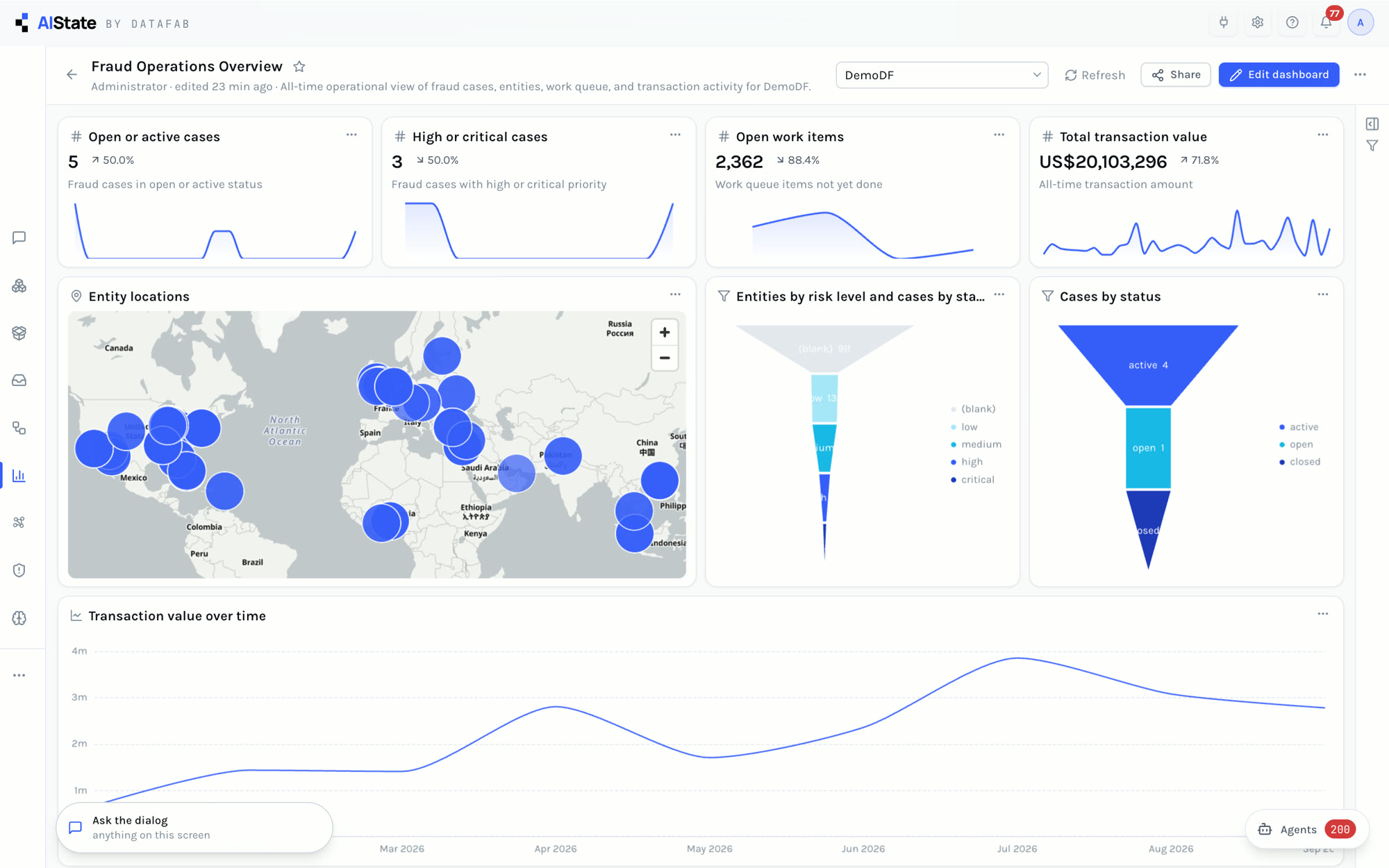
Business intelligence on what the organization itself knows: its cases, its work queue, the subjects in its investigations and their money — live, and governed like every other record. A fraud lead describes the dashboard they want and the Dialog builds it: four headline numbers, a map of the subjects, a risk funnel, cases by status and the money over time, every chart run and checked as the person asking. A follow-up changes it; then supervisors, financial crime analysts, team leads and leadership each get their own view. Companion to the feature guide.
“This is business intelligence on AIState: dashboards over what the bank itself knows — its cases, its work queue, its subjects and their money — live, and governed like everything else.”
The Dashboards list.
“The quickest way to build one is to ask. A fraud lead describes the dashboard they want, in plain words: four headline numbers across the top, a map, a risk funnel, and the money over time.”
A new conversation; the request typed into the Dialog.
“The Dialog hands the request to the dashboard assistant. It looks only at the data this person may read, drafts every chart, runs each one as them, and lays them out, four across. In about twenty seconds the dashboard is built, and checked: every chart has run, and returned data. Nothing was dragged into place by hand.”
The Dialog at work on the request, then its answer: every chart run and checked.
“Here it is. Four headline numbers across the top: cases still open, the high and critical ones, the open work items, and the total value of the transactions the investigations hold. Each number carries its trend over time, so a change shows up the day it starts, not at the end of the quarter.”
The fraud operations dashboard: the four numbers across the top and their trend lines.
“The map plots every subject with a known location, straight from the graph. Each bubble is real people and organizations in the investigations — not a spreadsheet someone exported. Click a bubble, and the whole dashboard filters to it: the numbers, the funnel, the charts. Click again, and it clears.”
The map zoomed in and out; bubbles clicked to filter the whole dashboard, then cleared.
“The risk funnel: every subject by risk level, from low, through medium and high, down to the few that are critical. The ones to look at first are at the bottom. Beside it, cases by status, and below, the value of the money moving through the investigations, month by month.”
The funnel by risk level, cases by status, and transaction value month by month.
“Nothing is fixed. Edit the dashboard to drag a chart, resize it, or add headings and notes — then save, or discard.”
Edit dashboard: the drag handles, then Discard.
“Or ask again. The same conversation changes the dashboard: here, a table of the ten largest counterparties, added at the bottom. The assistant changes only what was asked, re-runs the charts, and keeps everything else where it was.”
The follow-up typed into the same conversation; the dashboard with the counterparties table at the bottom.
“Filters apply to every chart at once: by time, by status, by any column the data has. Share it with a person, a department, or the whole workspace. Sharing gives the dashboard, never the data: every chart runs as the person viewing it, so a restricted case stays restricted.”
Show filters; the Share dialog.
“Different teams need different views. Templates give each of them a starting point, built from the same system-wide tools. Supervisors get case operations: the load on each investigator, deadlines coming up, and how long cases have been open. Financial crime analysts get the money: flows between accounts and counterparties, and the patterns in them. Team leads get the work queue: what is waiting, who owns it, and what is about to breach its clock. And leadership gets the risk picture, across every workspace they are allowed to see.”
The templates, then the case operations, money, work queue and risk dashboards.
“Underneath, every dashboard reads the same governed datasets — cases, tasks, evidence, the work queue, subjects, transactions — each filtered to what the viewer may see. With the right permission, the bank's own systems too: SQL datasets read in place over the connected databases, never copied into the platform.”
The datasets; the SQL screen running a query on the login attempts table.
“And any chart can be built by hand: twenty types, from headline numbers and maps, to funnels, sankeys and graphs. One set of tools, every team its own view — and every number traceable to the record behind it.”
The chart builder’s chart types; the fraud dashboard again.
In the Dialog or from the dashboard itself; every chart run as the person asking, and any that came back empty reported
Headline numbers, tables, funnels, maps, sankeys, graphs and more; any chart can also be built by hand
By time, value or range across every chart at once, or click a point on any chart to filter the rest
Cases, tasks, evidence, the work queue, subjects, transactions and more, each limited to what the viewer may see; SQL datasets read in place
Templates for case operations, the work queue, financial flows, threat intelligence, risk and AI usage
Shared per person, department, workspace or everyone; every chart runs as the person viewing it
Every document in a case gets a full working space. The original is hashed, encrypted at rest and never changed. Document understanding writes a brief, the people and companies named and the material clauses, each quoted from the page; the document answers questions from its own pages. The team finds, highlights, bookmarks and draws on the page, all listed in one sidebar. Every version is kept with its source; change detection and a side-by-side redline show what changed word by word; and authenticity checks read the file’s own record — signatures, saves, programs and dates — to find a figure changed after signing. Companion to the feature guide.
“AIState gives every document in a case a full working space. Any file can be read page by page, analysed by AI, marked up by the team, compared across versions, and checked for tampering, all in one place.”
The case’s Documents tab.
“The original is kept exactly as it arrived: hashed on upload, encrypted at rest, and re-checked against its hash on every download. Highlights, notes, analyses and questions are stored beside it, never in it.”
The deed opened page by page; its original file details.
“Any document can be translated with one click. The translation runs on the organization’s own model, is kept with the document, and switching back to the original is instant.”
Translate → French, then back to the original.
“Documents change over time, so each one carries its versions. Every version is its own file, hashed and kept, with a note on where it came from, and any of them can be opened, analysed or compared.”
The versions menu: four versions, each with its note.
“Document understanding reads every page and produces a brief, the people, companies and identifiers it names, and its material clauses. Every point is quoted from the page, and one click jumps to the exact passage.”
Document understanding: the brief, key entities and material clauses; a cited clause opened on the page.
“Find searches every page and steps through each match. Any passage can be highlighted in colour, and any page bookmarked with a label. Everything is shared with the team working the case.”
Find → each match in turn; a highlight on a clause; a bookmark on the page.
“Annotation mode draws straight onto the page: boxes, arrows, free drawing and sticky notes, in a choice of colours. Every mark records who made it, and the original underneath is never touched.”
Annotate: a red box around a clause, an arrow and a sticky note.
“The sidebar gathers the pages, bookmarks, highlights and drawings in one list. Every item is a click away and shows who made it.”
The markup sidebar: pages, bookmarks, highlights and drawings.
“Questions go to the document itself. Answers come only from its pages, with the supporting passages quoted and linked, and every question is kept with who asked it.”
A question asked of the document; a quoted passage opened.
“Change detection compares every version with the one before it. The changes timeline shows the words added and removed, the pages affected, and each changed passage in context.”
The changes timeline between versions.
“Any two versions open side by side as a redline. Deletions are struck through, insertions marked, so changed amounts, new clauses and new names stand out at once.”
Version 2 against version 3 as a redline.
“Some changes are designed not to be noticed. This copy looks identical to the earlier version: the same pages, the same layout, the same wording at a glance.”
The certified copy opened.
“The redline finds the single difference in the whole document: one figure in one clause, changed from one hundred thousand to five hundred thousand. Nothing a reader would spot by eye.”
The certified copy against the operative deed: one figure changed.
“Authenticity checks read the file’s own internal record, not a model’s guess. They validate digital signatures, list every save inside the file, the programs that touched it, and its dates. Here, the content was changed after it was signed, with an online PDF editor, and the panel says exactly which page.”
Authenticity: findings, the digital signature and the saves inside the file.
“A version with no signs of alteration says so, and the panel is careful to note that finding nothing is not proof a file is genuine. Every version added and every question asked is in the audit trail.”
The operative deed’s authenticity: no signs found.
“Comparison is not limited to versions. Any document can be opened beside any other in the case, for example an agreement next to the amendment that claims to change it.”
Compare with another exhibit: the deed beside its amendment.
“That is advanced document analysis on AIState: originals that cannot change, AI that quotes its sources, every version kept, every change shown, and every alteration found in the file itself.”
The certified copy against the operative deed, one last time.
Hashed on upload, encrypted at rest, re-checked on every download; everything else is stored beside the file, never in it
A brief, key entities and material clauses, every point quoted and one click from its page; questions answered only from the document
Find, colour highlights, bookmarks, boxes, arrows, free drawing and sticky notes — each with who made it, all in one sidebar
Each version its own hashed file with where it came from; any version opened, analysed, translated or compared
A changes timeline between versions and a side-by-side redline, word by word — with any version or any other exhibit
Digital signatures validated, every save inside the file, the programs that touched it and its dates; changes after signing named by page
One working day at a Frankfurt bank, seen through AIState. The IT administrator catalogues where the data comes from; an analyst onboards a customer; an approver and the MLRO decide within policy; a relationship manager meets the limits of what she may see; screening, quality assurance and a view across all cases close the day. Every person does one real job, every screen is the live product, and the film is narrated and subtitled. Open the full film page, with every scene →
The day starts with the data. The Knowledge Fabric catalogues where the bank's information comes from and reads each system where it lives. Kevin opens one source, checks who may read it, how good it is and what is built from it, then looks at the rules and the agents the platform runs.
Ruth runs the FCU team's daily work. She opens the team's workspace, reads the day at a glance, and looks into one customer, Nordvik, whose records come from many systems.
A retail current account for Ade Balogun is assigned to Priya. She reads what the bank already knows, what the agents have done, meets each requirement with a note under her name, and proposes the decision.
The approver decides what the team proposes. Thomasz approves Priya's decision on Ade Balogun, then takes a harder corporate case, Aurelia Fintech, follows its ownership, raises the route to enhanced due diligence and escalates to the MLRO.
The escalation lands with the money-laundering reporting officer. Marcus sees how Aurelia links to a sanctions case through a shared director, asks the assistant who is really behind the case, declines a request for a provisional clear, and resolves the escalation.
Sophie looks after the client but is not on the investigation. She reads the MLRO's answer, then the film shows what she can and cannot see.
The escalation has come back resolved. Thomasz reads the case in time, asks the assistant how it evolved and why each step was taken, then opens Kessler and Roth, a customer refusing to give ownership information, and reports a concern to the second line.
Lena checks the bank's customers against sanctions and watch lists and decides what each hit really means. She reads last night's screening in plain words, reviews the overnight exceptions, and records a decision.
Ruth is back for three checks before the day ends. The Estate graph shows every customer and connection across the workspaces. A red alert leads her to one company, its case and its changes; then an incident on another case.
Daniel is the fourth eye: the person who checks finished work before it stands. A pushed alert leads him to the KYC file on Aurelia Fintech, which he reviews field by field.
One last question for the MLRO: which of the bank's cases lean on each other? He looks at the case book, then asks the assistant the same question in plain words.
This film is an illustrative scenario; Meridian Bank AG, the customers and every person in it are fictional.
The feature guide has a screenshot or clip of every part of the platform; the platform page explains how it is built and governed.